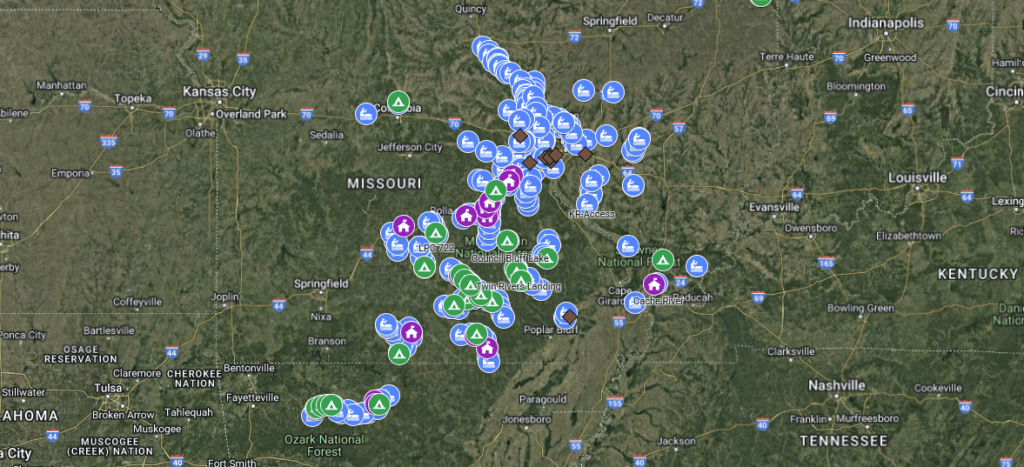
Longtime club member Jim Bensman has created an incredible club resource!
From Jim: It has all the put ins and take outs we use. It also has campgrounds, outfitters, and meeting places. All you have to do is open the map and select the icon and then start. It has the EXACT place to go to. In some places there are mistakes in the Google Maps data. In those places I have the last spot Google Maps will take you too and then the directions from there.
How to get the map on your computer and phone: Make sure you are signed into your Google account. If you do not have one, sign up for one. Click on the link below on your computer, not your phone or tablet. (It may work on them now). After you have clicked on this link you will be able to access the map on your computer or phone. You never have to click it after the first time.
https://www.google.com/maps/d/edit?mid=1uU83yh27ba3WCkOt13JLkXJBThc&usp=sharing
To access the map on your computer, go to https://www.google.com/maps/ In the upper left, you will see 3 lines. Click on it. Then click on your places. Then click on maps. Then select STL Kayak Club.
To access the map on your phone, open GoogleMaps and make sure you are signed into your Google Account. On the bottom, click on you. Then down at the bottom select maps. Then select STL Kayak Club.